Online · Real-Time · Simple

The commercial TV budget, finally online.

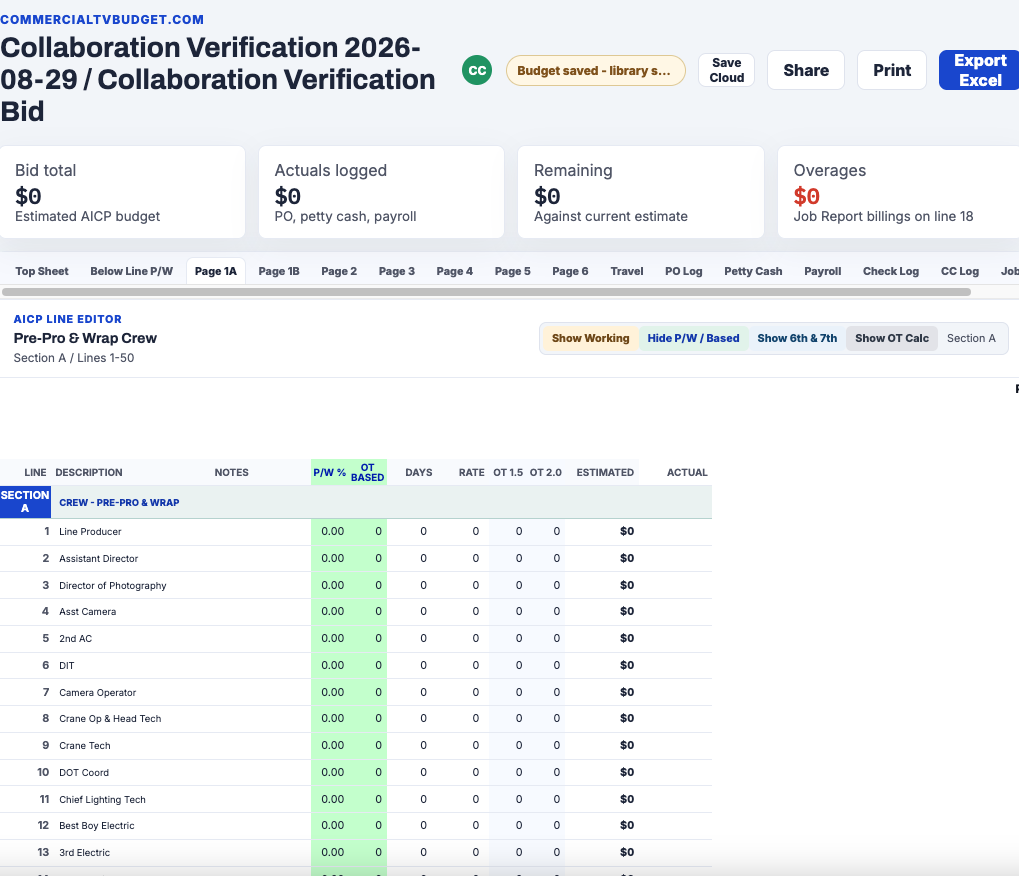
Cloud Based Budgeting. One live budget for the whole job. Producers, supervisors, and coordinators build estimates, track actuals, and work from the same current numbers.

No credit card required · Built by TV commercial producers & executive producers with 20+ years on the job
"Summer Launch" — :30 National Spot ALL CHANGES SAVED
Line ItemEstimateActualVariance
A — Pre-Production & Wrap$48,250$46,900($1,350)
B — Shooting Crew$112,400$114,750$2,350
C — Location & Travel$36,800$35,200($1,600)
D — Props & Wardrobe$21,500$19,875($1,625)
Total$218,950$216,725($2,225)
100%
Online — nothing to install
Live
Every number updates in real time
AICP-ready
Industry-standard line items
1 source
Of truth for every bid
SL
The Team

Built by a working producer, not a startup.

Scott Ludden has produced commercial TV campaigns for 25+ years — more than 500 campaigns and $250 million in production budgets, including multiple years of Super Bowl spots, and work for Toyota, Nike, Adidas, Best Buy, Walmart, and other Fortune 500 brands. He's a 2021 Emmy Award winner. Commercial TV Budget grew out of the same spreadsheets, email chains, and version-control chaos he saw across hundreds of real jobs — not a guess at what producers need.

25+
Years Producing
500+
Campaigns Produced
$250M+
Budgets Managed
2021
Emmy Winner
Every Role. One Budget.

Built for the whole production team

From bid request to wrap, every role on the job works from the same live numbers.

For Executive Producers & Producers

Run the bid. Watch it live.

  • Track live jobs in real time and keep every budget version organized
  • Review estimates, actuals, and variances from one current budget
  • Share a budget directly with the people working on the job
  • Export clean, client-ready budget summaries anytime
For Bidders & Production Companies

Respond fast. Win more work.

  • Build accurate bids from AICP-standard templates — no blank spreadsheets
  • Keep crew and equipment hold logs with every job, all in one place
  • Remember crew contacts, rates, equipment vendors, and rates for future jobs
  • Reuse organized hold and rate information across jobs and markets
For Supervisors & Coordinators

Track the money from set.

  • Create purchase orders that feed the PO log automatically
  • Remember crew, vendors, contacts, and payment details to reduce repeat entry
  • Route actual costs to the correct budget lines as the job progresses
  • Reconcile PO, payroll, petty cash, check, and credit card logs for a cleaner wrap
Features

Everything a bid needs. Nothing it doesn't.

Professional-grade budgeting tools that stay out of your way.

Real-Time Collaboration

Every edit appears live for everyone with access. No stale versions, no "which file is current?"

$

Industry-Standard Line Items

AICP-style sections A through K out of the box. Speak the same budget language on every job.

Budget Versions

Duplicate bids into clearly named versions and keep every version organized inside its job folder.

Estimate vs. Actual Tracking

Log actuals as you shoot. Over/under status per line, updated instantly, visible through wrap.

🔒

Permissions & Audit Trail

Control who sees what. Every change is logged with who, what, and when — your numbers stay yours.

Clean Exports

One click to polished PDF and Excel outputs for clients, agencies, and accounting.

V

Vendor & Log Memory

Remember vendors, crew, and contact details for faster entry across purchase orders and production logs.

PO

Automated Production Logs

Purchase orders feed the PO log, while payroll and petty cash totals reconcile through their own logs without duplicating actual costs.

H

Crew & Equipment Holds

Keep job-specific crew and equipment holds alongside the budget instead of in separate files.

How It Works

From estimate to wrap in three steps

1

Create or import

Start with a clean AICP-style budget or import an existing Excel budget into a job folder.

2

Build and collaborate

Edit the estimate, create versions, and share the live budget with the people working on the job.

3

Track, reconcile, and wrap

POs and production logs reduce repeat entry, feed actual costs to the right budget lines, and leave a cleaner reconciliation for wrap.

Product Walkthrough

See how a commercial budget moves through the platform

A guided look at creating a job, building the estimate, collaborating, automating production logs, tracking actuals, and wrapping the finished budget.

Commercial TV Budget walkthroughProduct video coming soon
"The bid used to live in six spreadsheets and forty emails. Now it lives in one place — and everyone's looking at the same number."
— Line Producer, National Broadcast Campaign

Commercial TV Budget is built by TV commercial producers and executive producers with over twenty years of experience bidding, shooting, and actualizing real jobs.

Pricing

Simple plans for every production

Try it free for 30 days. After your trial, continue with Production for $29/month.

Free

Try it on a real job
$0/first 30 days
  • One active collaborative project for 30 days
  • One AICP budget
  • Purchase orders that log into actuals
  • Crew holds
  • Equipment holds
  • Vendor memory
  • Excel + PDF exports
  • Calendars
  • Bid letters
  • Invite up to 2 production team members to the job
Start 30-Day Free Trial

Enterprise

For Production Companies
Quote
  • Unlimited bids and bid versions
  • Real-time collaboration
  • Company-wide vendor memory
  • Priority support
  • Actualization tracking
  • Excel + PDF exports
Reach Out for a Quote
Every plan includes Excel + PDF exports and actualization tracking. No feature is held hostage.
Questions

Before you ask

How does the free trial work?

You get 30 days of full access to one active job and can invite up to two teammates — enough to run a real budget from estimate to wrap before you pay anything. No credit card required to start.

What happens when my supervisor or coordinator needs to join?

Invite them during your free trial at no cost — the trial covers up to three people on one job. If you convert to a paid plan, each collaborator needs their own seat; pricing starts at $29 for the first seat, with lower per-seat pricing as your team grows.

How does seat pricing work for a production company?

Please contact support for production-company seat pricing and further inquiries.

Can I pay monthly, or do I have to commit to a year?

You can bill monthly, every six months, or annually. Six-month billing saves about 8%, annual saves about 17% — you can switch between billing terms at any time.

What is the Founding Member program?

The first 30 accounts to convert from a free trial to a paid subscription — within 45 days of launch — lock in $29 for their first seat for as long as they keep an active subscription, even if we raise prices later. The locked rate includes the features available at launch; new or updated features released later are not included. Full terms are in our Terms of Service.

What happens if I cancel and come back later?

You can cancel anytime; it takes effect at the end of your current billing period. If you're a Founding Member, cancelling ends that status — resubscribing later means standard pricing, not your original rate.

Is my budget data secure?

Every account has role-based permissions and a full audit trail — every change is logged with who, what, and when. Payment details are handled directly by Stripe; we never see or store your card number.

Can I import an existing Excel budget?

Yes — import an existing spreadsheet into a job folder and review the mapped line items before relying on them, since results depend on your workbook's structure and formulas.

What line-item structure do you use?

AICP-style sections A through K, out of the box — the same structure most agencies and production companies already bid and actualize against.
Your next bid, online in minutes.

Join the producers and bidders who left the spreadsheet behind.

Start a Budget Free